Analog drum synth · Public beta

Bonker

Hit it as hard as you can and maybe it will be gentle with you.

We all love a good BONK

01Voicesand effects

Five voices, zero ohms.

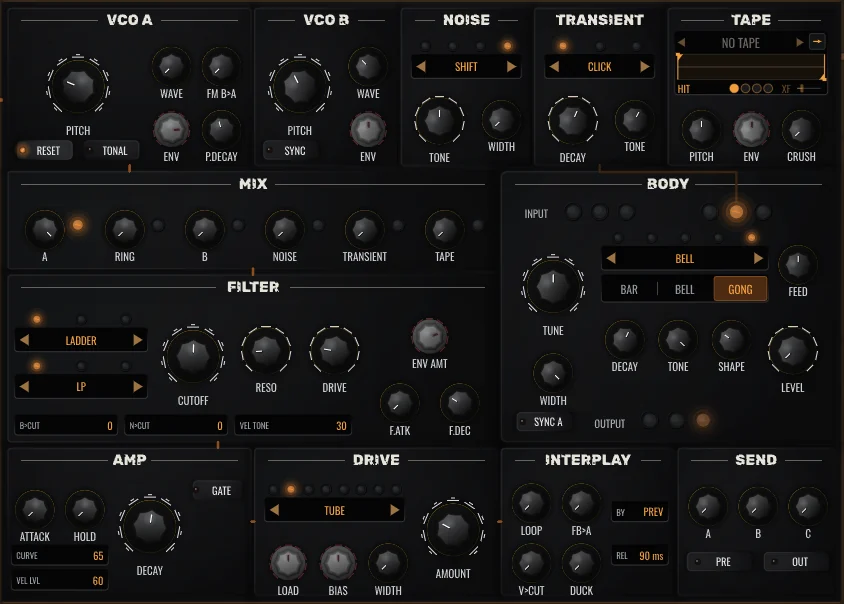
Five voices, each a flexible circuit: two oscillators, noise, a tape sampler, three analog filter types, a physically modelled resonator, stereo saturation with eight types, and interplay between the voices. Behind them, three effect returns with several reverb, delay and effect algorithms.

  • FM, sync and ring
  • Four kinds of noise
  • Three filter circuits
  • Drum, metal, string, bell
  • Reverb, delay, mod
  • An output per voice
One voice's face: VCO A and VCO B, noise, transient, tape, the mixer, the filter, the body, amp envelope, drive, interplay and the three sends.

02Sequencernotes and patterns

The Hit List.

Five lanes, each with its own length, rate, swing and direction. An adjustable meter, and scales for writing melodies. Write the hits by hand or let a generator do it, and chain eight patterns into a whole track. Parameter locks, conditions and scatter per step give never-ending variations.

  • 8 patterns, chained
  • Up to 64 steps per lane
  • A note per step, nine scales
  • Ratchet, probability, conditions
  • Knob locks per step
  • Generators for hits and values

03Modulationwhat moves the knobs

Moving parts.

Forty sources, 128 routes, and every knob listens. Followers respond to the signal as it plays, alongside LFOs, random sources and multi-stage envelope generators.

  • 5 LFOs · 5 MSEGs · 5 RND
  • A hit follower per voice
  • 128 routes
  • 8 macros

04Tapesand PRINT

The running tape.

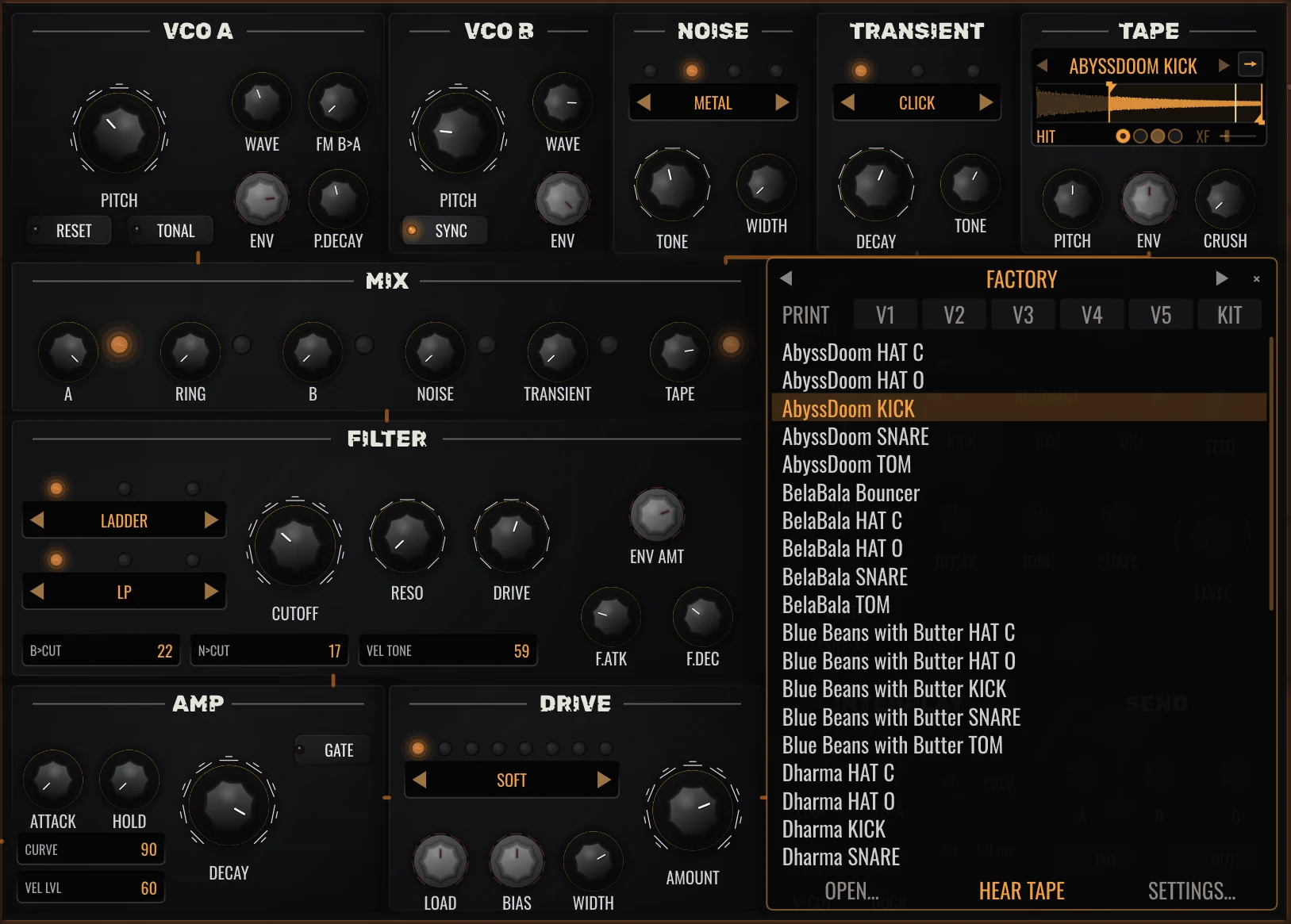
Every voice has a tape in it. Load a sample, or press PRINT and Bonker records itself, one voice or the whole kit, from the next hit. Then play the print back through any voice: reversed, crushed, or striking a body. It's very into its own work. A hard BONK resamples every voice at once, and the prints become a new kit.

  • PRINT a voice or the kit
  • Hard BONK resamples every voice
  • Four reels, switched per step
  • Saved inside the preset
The tape list open over voice 1: PRINT with V1 to V5 and KIT along its top, and the factory tapes below it.

05Scatterthe bonkers part

Random, on purpose.

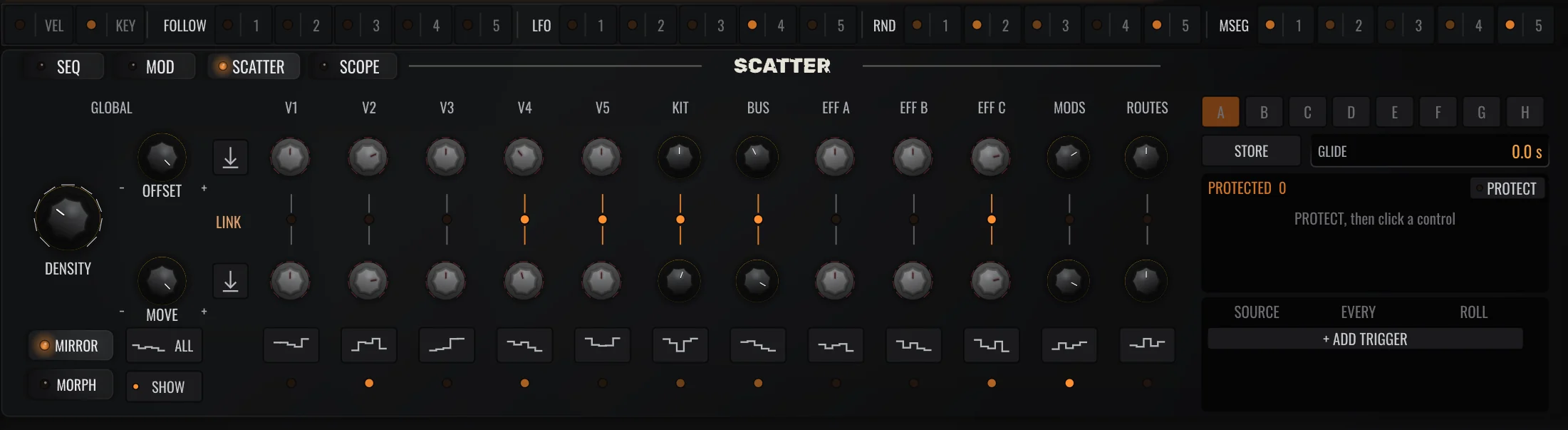
SCATTER pushes hundreds of knobs and modulations at once, each its own way, a little or a lot. The knobs stay where you left them until you commit. Keep a good accident as a scene and play it from a key.

  • 12 groups
  • OFFSET and MOVE
  • Rolls on its own if asked
  • Commit writes it in
  • 8 scenes, playable from MIDI
  • Per-step scatter
The SCATTER page: DENSITY, OFFSET and MOVE on the left, the twelve groups from V1 to ROUTES, and the scenes A to H with PROTECT and the triggers on the right.

06Bonkthe front of the unit

Percussive maintenance.

Sometimes the only thing that helps is a hard bonk.

A tap nudges the kit. A full swing breeds a new one from the presets inside it, or even resamples the current kit into a new one.

Listen to what Bonker can do when you hit it just right.

  1. PlasmaBeat
  2. On The Hunt
  3. BelaBala
  4. Gonogoo
  5. KekaBass
  6. FreakSoul
  7. KitchenDesk
  8. Bangeeer
  9. BreachBeach
  10. Luck and More
  11. Nomad Style
  12. Deladula

Beta

Try the beta

If you're interested, give it a try. Some things may not work as expected yet. But if you like what you see and can see the potential in it, I'd love to hear from you: what you like and what you don't, what works and what doesn't, and what you would like to see in it.

And if you just want to say hello, I'd be even happier to hear from you.

macOS and Windows. Installing it means you agree to the beta terms.

0.1.0betamacOS 11+ · Windows 10+ (64-bit)
  1. 01

    Install

    macOS: one notarized installer, VST3, CLAP and AU. Windows: VST3 and CLAP. The installer is not code-signed yet, so choose More info, then Run anyway. Rescan in your DAW.

  2. 02

    Play

    Everything works until 31 December 2026.

  3. 03

    Tell me

    Write to [email protected]. If something breaks, add the build stamp from the settings menu, your OS and DAW, and the steps that make it happen.

Specifications

FormatsVST3 · CLAP · AU (macOS)
PlatformsmacOS · Windows